Sora vs Veo 3: Which AI Video Tool is Better in 2025?
Sora vs Veo 3: Which AI Video Tool is Better in 2025?
You've probably seen stunning AI-generated videos flooding social media lately. Whether it's hyper-realistic cityscapes or creative character animations, two names keep coming up: OpenAI's Sora and Google's Veo 3. Both promise to transform your text prompts into professional-looking videos, but which one actually delivers?
If you're a content creator, marketer, or AI enthusiast trying to choose between these platforms, you're facing some real questions. Can you use these videos commercially? What about those watermarks that scream "AI-generated"? And most importantly, which tool gives you better quality for your time and money?
Let's break down everything you need to know about Sora vs Veo 3 in 2025, from output quality and audio capabilities to pricing and commercial usage rights.
Understanding the Basics: What Are Sora and Veo 3?
Before we dive into comparisons, let's get clear on what each platform actually offers.
OpenAI's Sora 2
Sora launched as OpenAI's answer to AI video generation, and version 2 brought significant improvements. The platform lives inside a standalone iOS app with a TikTok-style feed where users share their creations. This social approach makes it easy to get inspiration, but also means you're part of a very visible AI video community.
Key specs:
- Resolution: Up to 1080p
- Duration: 20 seconds (extendable to 60 seconds)
- Audio: Silent videos only (you'll need to add sound separately)
- Special feature: Cameos - create videos featuring your own likeness
- Access: Invite-only through the Sora app
Google's Veo 3
Veo 3 represents Google's premium offering in AI video generation. Unlike Sora's social platform approach, Veo 3 integrates into Google's ecosystem through tools like Gemini and Flow, focusing on professional production quality.
Key specs:
- Resolution: Up to 4K (for 8-second clips), 1080p for longer content
- Duration: 8 seconds at 4K, up to 2+ minutes at HD
- Audio: Native audio generation including dialogue, effects, and music
- Special feature: Synchronized sound eliminates post-production audio work
- Access: Available through Google Flow (currently US-only)
The fundamental difference? Sora prioritizes creative flexibility and social sharing, while Veo 3 targets professional content creators who need broadcast-quality output with integrated audio.
Head-to-Head Feature Comparison
Let's compare these tools across the features that actually matter for your workflow.
Video Quality and Resolution
Veo 3 takes the lead here. Its 4K output capability means you're getting cinema-quality visuals with detailed textures and lifelike rendering. When testing prompts about urban scenes, Veo 3 consistently delivers sharper details in backgrounds and more realistic lighting effects.
Sora caps at 1080p, which is perfectly fine for social media and web content. The quality is impressive for the resolution - you'll get smooth motion and good character consistency. However, if you're creating content for large screens or professional campaigns, that resolution limitation becomes noticeable.
Real-world impact: For YouTube or Instagram, both work great. For client presentations, advertising campaigns, or any premium use case, Veo 3's 4K gives you more flexibility.
Audio Capabilities: The Game-Changer
This is where Veo 3 pulls significantly ahead. The native audio generation isn't just background music - we're talking synchronized dialogue, environmental sounds, and realistic sound effects, all generated alongside your video.
Picture this scenario: You prompt "a chef preparing pasta in a busy Italian kitchen." Veo 3 gives you sizzling sounds, bubbling water, kitchen ambiance, and even the chef's movements synchronized with appropriate audio cues. It's immersive and production-ready.
Sora generates silent videos. Beautiful, but silent. You'll need to handle all audio in post-production using separate tools.
The verdict: If audio matters for your content (and it usually does), Veo 3 saves you hours of work and delivers more cohesive results.
Prompt Interpretation and Creative Control
Both platforms handle text prompts well, but they excel in different areas.
Veo 3 shines with:
- Cinematic realism and accurate camera direction
- Detailed lighting and texture specifications
- Precise adherence to technical descriptions
- Better physics simulation (objects move more naturally)
Sora excels at:
- Narrative storytelling with multiple characters
- Stylized and imaginative concepts
- Multi-shot sequences that tell a story
- Creative interpretation of abstract prompts
Testing the same prompt on both platforms often yields interesting differences. A prompt about "a woman walking through rainy Tokyo streets" gave us tighter framing in Sora (more intimate, shallow depth of field) versus Veo 3's wider, more immersive cityscape approach.
Editing and Workflow Tools
Sora's built-in editing features include Remix (style variations), Recut (scene-level adjustments), Blend, Loop, and Storyboard. These tools let you iterate quickly without leaving the platform.
Veo 3 focuses on generation quality rather than built-in editing. You'll typically export to a video editor for refinements. However, when integrated with platforms like Powtoon, you can enhance Veo 3 outputs with graphics, animations, and text overlays in a unified workspace.
Video Duration Limits
- Sora: 20 seconds standard, extendable to 60 seconds
- Veo 3: 8 seconds at 4K, up to 2+ minutes at HD
The longer duration capability of Veo 3 at lower resolutions gives you more flexibility for complete scenes or mini-stories without stitching multiple clips together.
The Watermark Question: Commercial Usage Reality
Here's where things get complicated for content creators planning to use AI videos professionally.
Sora's Watermark Approach
Sora embeds C2PA metadata and adds visible watermarks to generated videos. During testing, OpenAI has become increasingly strict about copyright protection. The platform will refuse prompts that even hint at copyrighted characters or styles, sometimes overly cautiously.
Commercial usage concerns:
- Visible watermarks identify content as AI-generated
- Strict copyright filters may block legitimate creative prompts
- Rights holders must opt-out character by character (no blanket protection)
- The social feed nature means your work is publicly visible
Veo 3's Watermark System
Veo 3 uses SynthID watermarking - an embedded digital signature that's less visually intrusive than Sora's approach. However, it's still present and identifies the content as AI-generated.
Commercial usage considerations:
- Less visible watermarking preserves aesthetic quality
- More permissive with creative prompts (less aggressive filtering)
- Professional integration through Google Workspace tools
- Better suited for commercial projects
Removing Watermarks: The Professional Solution
If you're creating content for commercial use, client work, or brand campaigns, AI watermarks present a real problem. They can:
- Reduce perceived professionalism
- Limit where you can publish content
- Create licensing uncertainty
- Distract from your message
The solution: EraseVideo for Mac
EraseVideo is specifically designed to handle AI video watermarks from platforms like Sora, Veo 3, and others. Here's why it's become the go-to tool for professional creators:
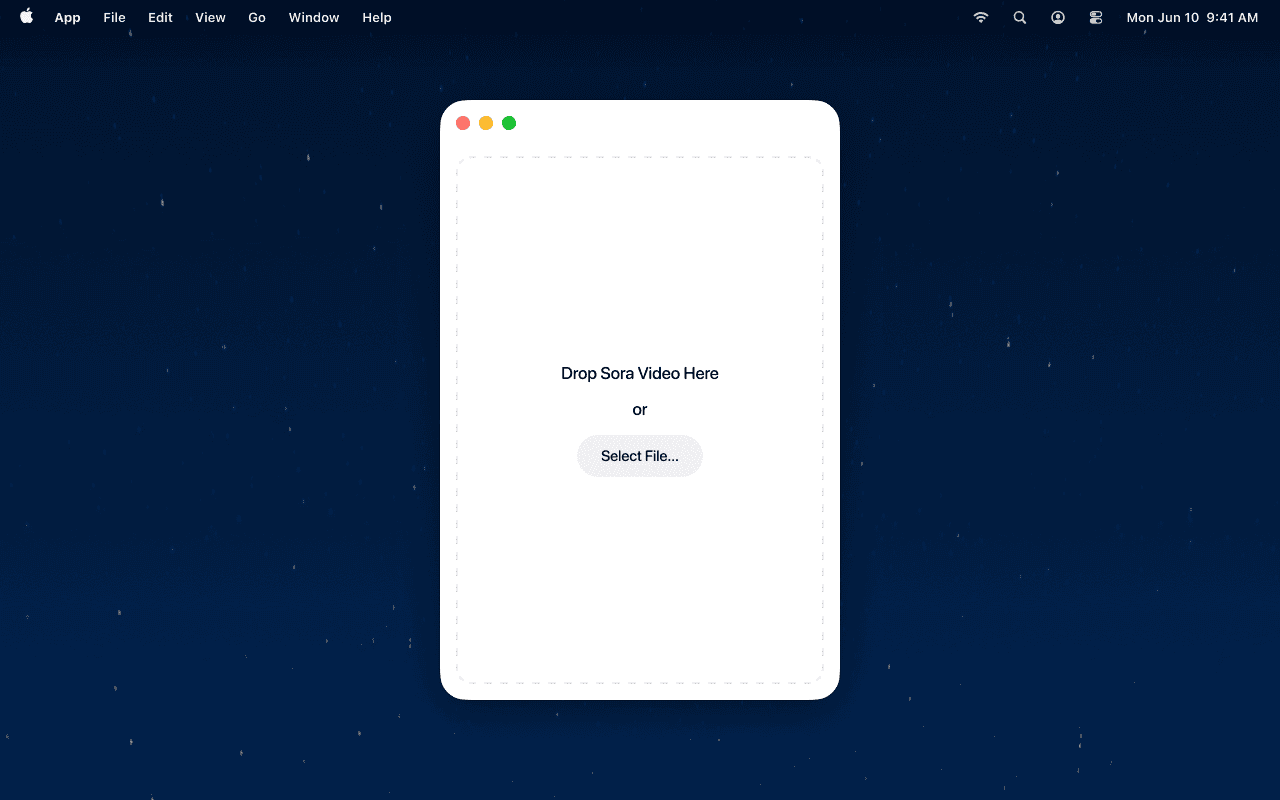
How EraseVideo works:
- Smart platform detection - Automatically identifies whether your video is from Sora, Veo 3, Runway, or other AI platforms
- Intelligent watermark location - No manual selection needed; the AI finds watermarks automatically
- Advanced AI repair - Uses ProRes encoding to rebuild affected areas naturally, without obvious patches
- Complete privacy - Everything processes locally on your Mac; videos never upload to cloud servers
- Quality preservation - Maintains original resolution, frame rate, color grading, and audio tracks
Processing steps:
- Download EraseVideo from erasevideo.app
- Drag your Sora or Veo 3 video into the app
- Click "Start Processing" (watermark detection is automatic)
- Wait for AI processing to complete
- Export your clean video (saved as originalname_unmarked.mp4)
Pricing that makes sense:
- Free trial: 2 videos per day
- Annual subscription: $19.9/year (ideal for regular users)
- Lifetime license: $49.9 one-time payment
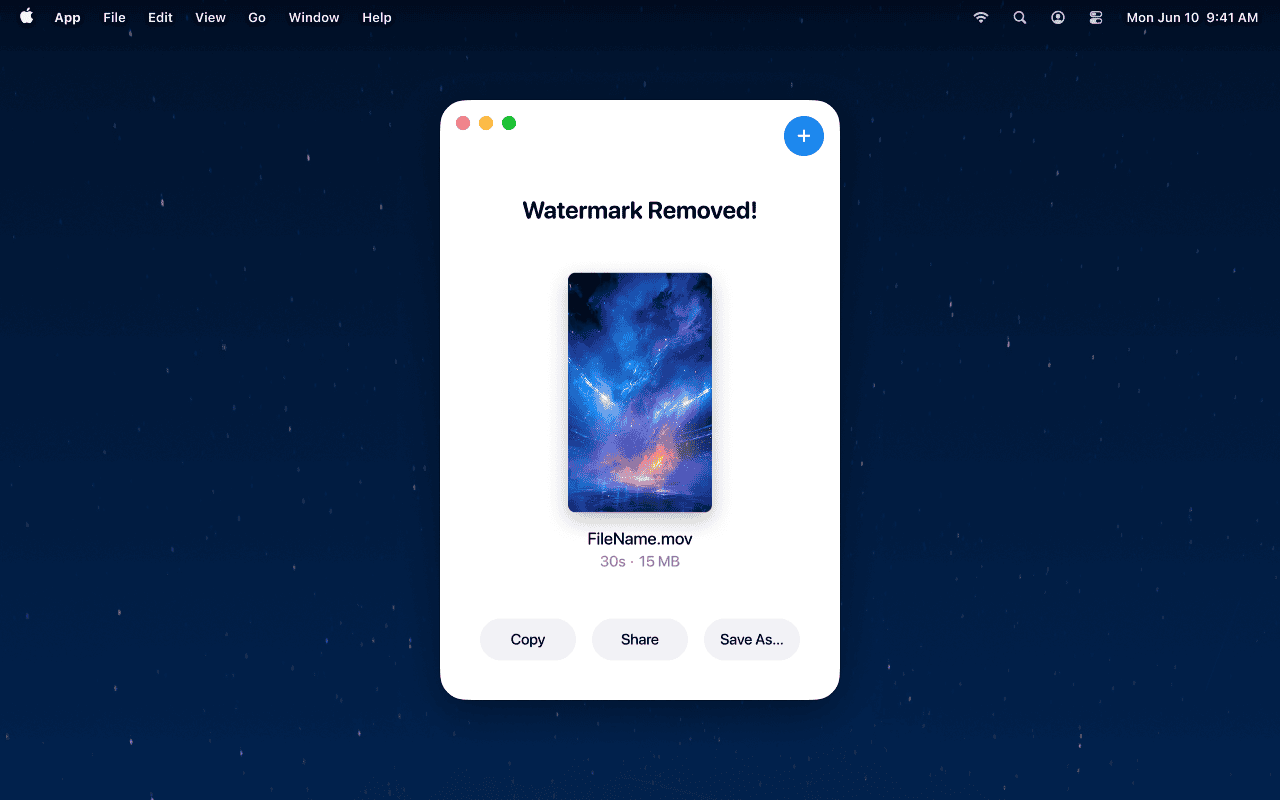
The key advantage? EraseVideo handles the specific watermark patterns used by both Sora and Veo 3, producing natural-looking results without the trial-and-error of generic video editing tools.
Pricing and Accessibility Comparison
Cost and availability play a huge role in platform choice.
Sora Pricing Structure
Access through ChatGPT subscription tiers:
- ChatGPT Plus: $20/month (50 videos/month, 720p, 5 seconds)
- ChatGPT Pro: $200/month (500 videos/month, 1080p, 20 seconds)
The credit system means video costs vary by resolution and duration. Higher quality = more credits consumed per generation.
Availability: Most countries except UK, Switzerland, and EEA regions.
Veo 3 Pricing Structure
Access through Powtoon integration:
- Lite plan: $15/month (5 videos/month, 4K, 8 seconds, 25 credits/year)
- Professional plan: $40/month (unlimited videos, 4K, 8 seconds, 80 credits/year)
- Business plan: $125/month (unlimited videos, 4K, 8 seconds, 350 credits/year)
Availability: Currently global, though Flow integration is US-focused.
Cost-Effectiveness Analysis
| Usage Pattern | Best Choice | Reasoning |
|---|---|---|
| Social media creator (high volume) | Sora Plus ($20/month) | More generations, good enough quality for social platforms |
| Marketing professional | Veo 3 Professional ($40/month) | Unlimited generations, 4K output, integrated audio |
| Enterprise/Agency | Veo 3 Business ($125/month) | High credit allocation, team features, commercial-ready quality |
| Experimental/Learning | Sora Plus ($20/month) | Lower entry cost, built-in editing tools |
Real-World Performance: Testing Results
We ran identical prompts through both platforms to see how they perform in practice.
Test 1: Urban Cinematic Scene
Prompt: "A young woman walking through crowded Tokyo streets at night during light rain. Neon signs reflect off wet asphalt. Handheld camera follows from behind with shallow depth of field."
Veo 3 result:
- Wider angle capturing full street scene
- Realistic neon reflections in water
- Ambient street sounds, footsteps, distant traffic
- 4K clarity showing background details
- 8-second duration
Sora result:
- Tighter framing, more intimate feel
- Excellent depth of field effect
- Silent output (requires post-audio)
- Smooth motion and good character consistency
- 5-second duration at 720p (Plus tier)
Winner: Veo 3 for immersive realism and complete production; Sora for artistic framing choices.
Test 2: Character Dialogue Scene
Prompt: "Two friends sitting by café window on rainy afternoon. Watercolor animation style. One says gently: 'Sometimes the smallest step can change everything.' Include subtle mouth animation and rain sounds."
Veo 3 result:
- Painterly 2D animation style achieved
- Synchronized lip movement with dialogue
- Rain sounds and ambient café audio
- Natural lighting and visible brush strokes
- Complete scene ready to use
Sora result:
- Generated 3D animation instead of 2D watercolor style
- Silent video requiring separate voice recording
- Good visual quality but didn't match style request
- Would need significant post-production work
Winner: Veo 3 by a significant margin - followed prompt more accurately and delivered usable output.
Test 3: Copyright Content Handling
We tested both platforms' ability to handle prompts involving copyrighted characters or styles.
Sora: Refused multiple prompts, even for generic "superhero" requests that didn't specify brands. Post-launch crackdown means very conservative filtering.
Veo 3: More permissive with creative prompts. Generated stylized character videos without specific brand names, though results varied in accuracy.
Reality check: Neither platform is designed for creating copyrighted content, and attempting this violates terms of service. For legitimate creative work, Veo 3's less aggressive filtering allows more artistic freedom.
Use Case Recommendations
Different creators have different needs. Here's when each platform makes the most sense.
Choose Veo 3 if you're:
✅ Creating professional marketing or advertising content
✅ Producing videos for client deliverables
✅ Making content where audio integration is essential
✅ Working on projects that need 4K output
✅ Building a library of premium stock footage
✅ Part of an enterprise team with collaborative workflows
Example scenario: A marketing agency creating product launch videos needs synchronized voiceovers, 4K resolution for trade show displays, and fast turnaround. Veo 3's native audio and higher resolution eliminate multiple post-production steps.
Choose Sora if you're:
✅ Creating social media content at scale
✅ Experimenting with AI video for personal projects
✅ Working on a limited budget
✅ Comfortable adding audio in post-production
✅ Valuing built-in editing and remix capabilities
✅ Interested in the social/community aspect
Example scenario: A content creator making daily Instagram Reels can use Sora's Remix feature to generate multiple style variations quickly, add trending audio separately, and publish at 1080p - perfect for mobile viewing.
The Hybrid Approach
Many professional creators use both platforms strategically:
- Sora for rapid prototyping and style exploration
- Veo 3 for final production renders
- EraseVideo to remove watermarks before client delivery
Technical Limitations to Consider
No platform is perfect. Here's what each tool struggles with.
Veo 3 Limitations
- Regional restrictions: Flow integration currently US-only
- Aspect ratio options: Limited to 16:9 and 9:16
- Input flexibility: Cannot input video clips like Sora (text and images only)
- Rendering time: 4K generation takes longer than Sora's 1080p
- Learning curve: Professional feature set requires more upfront learning
Sora Limitations
- No audio generation: Major workflow gap requiring separate tools
- Resolution cap: 1080p maximum limits professional applications
- Copyright sensitivity: Overly aggressive filtering blocks legitimate prompts
- Capacity issues: Service sometimes hits limits during peak usage
- Physics inconsistencies: Complex actions over longer durations can look unnatural
- Geographic availability: Not accessible in EU/UK regions
Common AI Video Challenges (Both Platforms)
- Hand and finger rendering: Still problematic in both systems
- Text generation: Creating readable text in videos remains difficult
- Extended duration coherence: Longer videos sometimes lose consistency
- Complex physics: Multi-object interactions can appear unnatural
- Style consistency: Maintaining exact visual style across multiple generations
Future Developments to Watch
Both platforms are evolving rapidly. Here's what's expected in 2025-2026.
Veo 3 Roadmap
Q3 2025: Global rollout beyond US markets
Q4 2025: Deeper Google Workspace integration via Flow
2026: Expected 8K support and longer video durations
Sora Development Timeline
Q2 2025: EU and UK market launch anticipated
Q3 2025: Native audio generation reportedly in development
2026: Potential 4K support and enterprise-focused features
Industry Trends
AI video generation is expected to:
- Reduce professional production costs by 40-60%
- Compress creative timelines from weeks to hours
- Enable new hybrid workflows (AI generation + human refinement)
- Create new roles focused on AI prompt engineering and curation
Making Your Decision: Sora vs Veo 3
After extensive testing and real-world use, here's the bottom line.
Veo 3 wins for:
- Professional content creation
- Commercial projects and client work
- Audio-integrated productions
- Maximum quality output
- Enterprise and agency workflows
Sora wins for:
- Social media content at scale
- Budget-conscious creators
- Quick experimentation and iteration
- Community engagement and inspiration
- Creative storytelling flexibility
The Quality-Price Sweet Spot
| Budget Level | Recommendation | Monthly Cost |
|---|---|---|
| Under $25/month | Sora Plus | $20 |
| $25-50/month | Veo 3 Professional | $40 |
| $50-150/month | Veo 3 Business or Sora Pro | $125 or $200 |
| Enterprise | Veo 3 Business + EraseVideo | $125 + $49.9 one-time |
Critical Success Factor: Watermark Handling
Regardless of which platform you choose, professional use requires clean, watermark-free output. Both platforms embed identifying marks that limit commercial applications.
EraseVideo solves this problem comprehensively:
- Handles watermarks from both Sora and Veo 3 automatically
- Preserves video quality through AI-powered reconstruction
- Processes locally for complete privacy protection
- One-time purchase option ($49.9) eliminates recurring costs
- Supports 7+ AI video platforms beyond just Sora and Veo
For creators serious about monetizing AI video content, EraseVideo isn't optional - it's essential infrastructure.
Getting Started: Next Steps
Ready to choose your platform and start creating? Here's your action plan.
If choosing Veo 3:
- Sign up for Powtoon (starts at $15/month for Lite)
- Access Veo 3 through the platform integration
- Start with 4K short clips to test quality
- Download EraseVideo for professional output
- Build your prompt library for consistent results
If choosing Sora:
- Subscribe to ChatGPT Plus ($20/month minimum)
- Join the Sora waitlist for app access
- Explore the community feed for prompt inspiration
- Plan your post-production audio workflow
- Download EraseVideo for watermark-free exports
The Professional Creator Setup
Essential tools for serious AI video work:
- Primary generator: Veo 3 (Professional plan: $40/month)
- Watermark removal: EraseVideo (Lifetime: $49.9 one-time)
- Video editing: Your preferred NLE (Premiere, Final Cut, DaVinci)
- Audio production: Separate audio tools or AI voice generators
Total monthly cost: ~$40-65/month for production-ready AI video workflow
Conclusion
The Sora vs Veo 3 debate doesn't have a single winner - it has the right tool for the right job.
Veo 3 delivers superior quality, integrated audio, and professional-grade output that justifies its higher price point for serious creators. If your content generates revenue or represents clients, Veo 3's capabilities and 4K resolution provide the quality your work demands.
Sora offers excellent value for social media creators, experimenters, and budget-conscious users who can handle audio separately. Its built-in editing tools and lower entry cost make it ideal for learning AI video generation or creating high-volume social content.
The real key to success? Pair either platform with EraseVideo to unlock full commercial potential. AI watermarks limit where and how you can use your creations - removing them professionally opens every door.
Start creating watermark-free AI videos today:
Try EraseVideo Free - 2 videos per day, no credit card required
Get Lifetime Access - $49.9 one-time payment, unlimited use
Related Articles
Related Articles

Best TikTok Watermark Removers for Mac in 2025 (Top 5)
Discover the top 5 TikTok watermark removers for Mac users in 2025. Compare features, pricing, and quality to find the perfect tool for your content creation needs.
How to Remove TikTok Watermark in 3 Easy Steps (2025)
Learn how to remove TikTok watermarks from your videos using proven methods. Compare online tools vs desktop software for best results.

7 Best Free AI Watermark Removers for Mac Users (2025)
Discover the top free AI watermark removal tools for Mac in 2025. Compare features, quality, and privacy options to find your perfect solution today.