How to Remove TikTok Watermark in 3 Easy Steps (2025)
How to Remove TikTok Watermark in 3 Easy Steps (2025)
You've downloaded a TikTok video you want to repurpose for Instagram, YouTube, or your website—but there's that persistent watermark in the corner. Whether it's the TikTok logo bouncing around or the username overlay, these watermarks can make your content look unprofessional when shared on other platforms.
The good news? Removing TikTok watermarks is easier than you might think. In this guide, I'll walk you through three proven methods to get clean, watermark-free videos—from quick online solutions to professional desktop tools that preserve your video quality.

Why TikTok Adds Watermarks (And Why You Might Want to Remove Them)
TikTok automatically adds watermarks to every video you download for a simple reason: brand visibility. With over 1 billion active users worldwide, TikTok wants its logo to travel wherever the content goes.
But here's the problem for content creators:
- Cross-platform sharing: The TikTok watermark looks out of place on Instagram Reels, YouTube Shorts, or Facebook
- Professional presentations: Client work or business content needs a clean, branded appearance
- Content repurposing: Your original content deserves to be platform-neutral
- Aesthetic consistency: Watermarks can obstruct important visual elements or text overlays
The challenge is that TikTok's watermark isn't just a static logo—it can move around the screen, making simple cropping ineffective.
Method 1: Download Without Watermarks (Prevention Approach)
Before we talk about removing watermarks, let's cover the easiest solution: downloading TikTok videos without watermarks in the first place.
Using Online TikTok Downloaders
Several web-based tools can fetch the original video file before TikTok applies its watermark:
How it works:
- Open the TikTok app and find the video you want to download
- Tap the "Share" button and select "Copy Link"
- Visit a watermark-free downloader like SnapTik or SSSTikTok
- Paste the video URL into the download field
- Click "Download" and save the clean video file
Pros:
- ✅ Free and instant
- ✅ No software installation required
- ✅ Works on any device (phone, tablet, computer)
Cons:
- ❌ Only works for videos you haven't already downloaded
- ❌ Requires internet connection
- ❌ Some tools have file size limits
- ❌ Doesn't help with videos already saved with watermarks
This method is perfect for planning ahead, but what if you already have watermarked videos? That's where removal tools come in.
Method 2: Online Watermark Removal Tools
If you already have TikTok videos with watermarks, online removal tools offer a quick browser-based solution.
Popular Online Options
Tools like Watermarkremover.io and similar services use AI to detect and remove watermarks from your videos.
Step-by-step process:
- Visit the watermark removal website
- Upload your TikTok video (or paste the URL)
- The AI automatically detects the watermark location
- Wait for processing (usually 30 seconds to 2 minutes)
- Download your watermark-free video
What to expect:
- Processing happens in the cloud
- Most tools offer limited free trials
- Quality varies depending on watermark complexity
- File size restrictions on free plans
Limitations to consider:
- Privacy concerns: Your videos are uploaded to third-party servers
- Quality loss: Compression during upload/download can reduce video quality
- Subscription costs: Most tools require paid plans for regular use
- Processing speed: Cloud processing can be slow during peak hours
- Internet dependency: Requires stable, fast internet connection
Online tools work well for occasional use, but content creators processing multiple videos daily need a more reliable solution.
Method 3: EraseVideo for Mac (Professional Desktop Solution)
For content creators who need consistent, high-quality results, desktop software offers the most control and best output quality.
Why Desktop Software Outperforms Online Tools
EraseVideo is specifically designed for Mac users who work with AI-generated and social media videos. Unlike online tools, it processes everything locally on your computer.

How EraseVideo Works
Step 1: Import Your Video
- Download and install EraseVideo from erasevideo.app
- Drag and drop your TikTok video into the application
- EraseVideo automatically detects it's a TikTok video
Step 2: Automatic Watermark Detection
Here's where EraseVideo shines—no manual selection needed:
- The AI instantly identifies the TikTok watermark location
- Handles both static logos and moving watermarks
- Detects multiple watermarks if present (username + logo)
Step 3: AI-Powered Removal
- Click "Start Processing"
- Watch real-time progress as the AI removes the watermark
- The software uses ProRes encoding to maintain video quality
- Processing happens entirely offline on your Mac
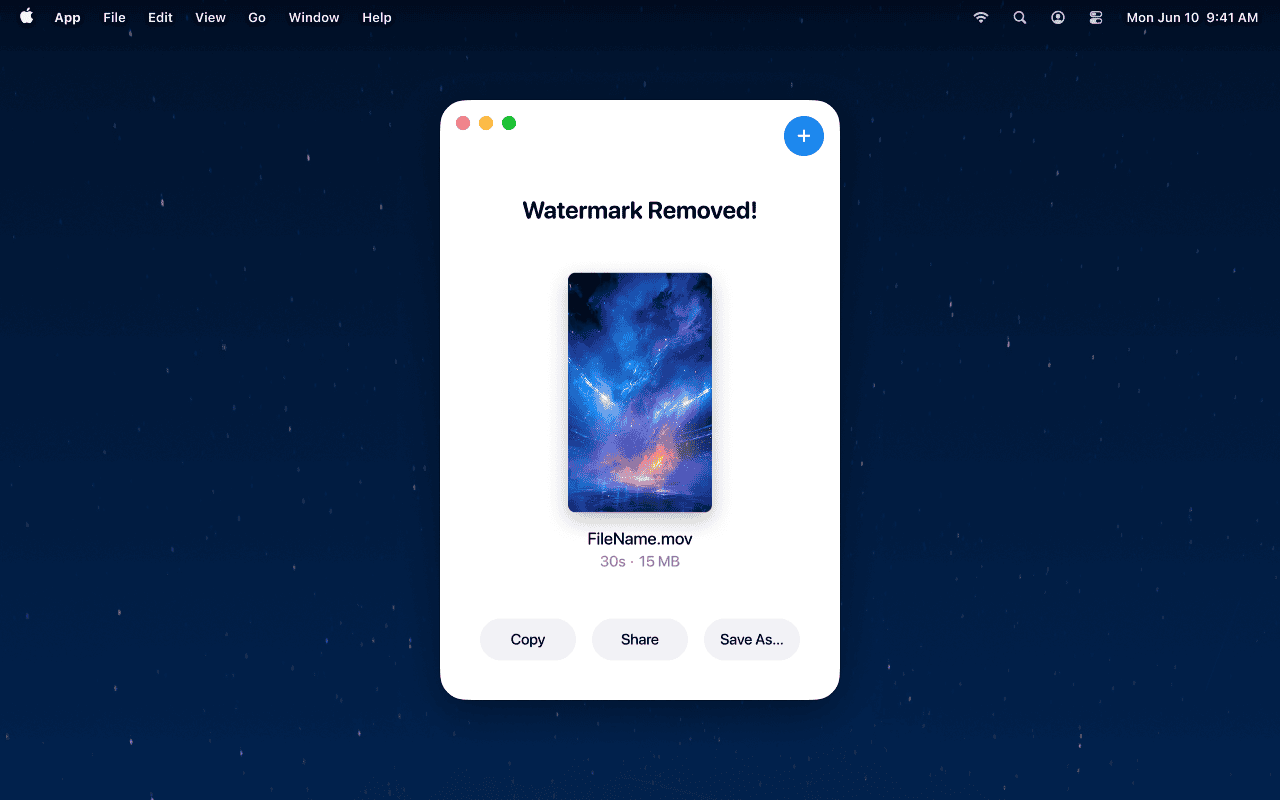
Step 4: Export Clean Video
- Your video is saved as
[original_filename]_unmarked.mp4 - Original resolution, frame rate, and audio are preserved
- No quality loss or compression artifacts
Key Advantages of EraseVideo
Complete Privacy
- Zero uploads—everything processes locally
- Your content never leaves your computer
- No cloud storage or third-party access
Superior Quality
- Maintains original video resolution and frame rate
- Preserves audio quality perfectly
- AI-powered edge blending for seamless results
- No compression or re-encoding artifacts
Time-Saving Automation
- No manual watermark selection required
- Automatic platform detection (TikTok, Sora, Veo, Runway, etc.)
- One-click processing workflow
- Batch processing support
Professional Results
- Edge-aware reconstruction technology
- Natural-looking fills that match surrounding pixels
- Works with complex backgrounds and moving watermarks
- Handles overlapping text and emojis
Pricing Options
EraseVideo offers flexible pricing for different user needs:
- Free Trial: Process 2 videos per day at no cost
- Annual Subscription: $19.9/year (perfect for regular users)
- Lifetime License: $49.9 one-time payment (best value for professionals)
Comparing Your Options: Which Method Is Right for You?
| Feature | Online Downloaders | Online Removers | EraseVideo (Desktop) |
|---|---|---|---|
| Best For | Planned downloads | Occasional use | Professional creators |
| Setup Time | Instant | Instant | 2-minute install |
| Processing Speed | Fast | Medium | Fast |
| Video Quality | Original | May compress | Original preserved |
| Privacy | URL sharing only | Upload required | 100% local |
| Automation | Manual copying | Semi-automatic | Fully automatic |
| Works Offline | No | No | Yes |
| Handles Complex Watermarks | N/A | Limited | Excellent |
| Cost | Free | Subscription | $19.9/year or $49.9 lifetime |
Quick recommendation:
- Use online downloaders if you're planning ahead and haven't downloaded the video yet
- Try online removers for one-off projects where privacy isn't critical
- Choose EraseVideo if you process videos regularly, need consistent quality, or value privacy
Tips for Best Results When Removing TikTok Watermarks
Based on extensive testing, here are some practical tips to get the cleanest results:
1. Start with Highest Quality Source Video
Download TikTok videos at the highest available resolution. Lower quality videos show more artifacts after watermark removal.
2. Avoid Re-encoding When Possible
Each time a video is re-encoded, quality degrades slightly. Desktop tools like EraseVideo minimize this by using professional codecs.
3. Check the Background Complexity
Watermarks over solid colors or simple backgrounds remove more cleanly than those over complex, moving scenes. The AI has an easier time reconstructing simple patterns.
4. Preview Before Finalizing
Always review the processed video before sharing. Look specifically at the watermark area during movement to ensure smooth, natural-looking results.
5. Keep Original Files
Maintain a backup of your original watermarked video. If you need to re-process with different settings, you'll have the source file ready.
6. Respect Copyright
Only remove watermarks from content you own or have permission to use. Removing watermarks from others' content without permission may violate copyright laws.
Frequently Asked Questions
Q: Is it legal to remove TikTok watermarks?
A: Removing watermarks from your own original content is perfectly legal. However, removing watermarks from someone else's copyrighted content without permission violates copyright laws and TikTok's terms of service. Always ensure you have the right to use and modify any video.
Q: Will removing the watermark reduce video quality?
A: It depends on the method. Online tools often compress videos during processing, which can reduce quality. Desktop software like EraseVideo uses professional encoding (ProRes 422) to maintain original quality, including resolution, frame rate, and color accuracy.
Q: Can I remove watermarks from TikTok live recordings?
A: Yes, the same methods work for live recordings. However, live recordings may have additional overlays (viewer counts, comments) that complicate removal. Desktop AI tools handle these complex scenarios better than simple online removers.
Q: How long does watermark removal take?
A: Processing time varies by method and video length. Online tools typically take 30 seconds to 2 minutes. Desktop software like EraseVideo processes most videos in under 60 seconds, depending on your Mac's processing power. A 1-minute TikTok video usually takes 20-40 seconds.
Q: Why do some watermarks reappear after removal?
A: This usually indicates incomplete processing or low-quality removal. If the AI doesn't fully reconstruct the area behind the watermark, residual traces can remain. Professional tools with better AI models (like EraseVideo) provide more thorough removal.
Q: Can I remove multiple watermarks at once?
A: Modern AI tools can handle multiple watermarks in a single video—for example, both the TikTok logo and username overlay. EraseVideo automatically detects and removes all watermarks in one processing pass.
Conclusion
Removing TikTok watermarks doesn't have to be complicated or expensive. Whether you choose the prevention method (downloading without watermarks), quick online tools, or professional desktop software, the right approach depends on your specific needs.
For content creators who regularly repurpose TikTok content for other platforms, EraseVideo offers the best balance of quality, privacy, and automation. The one-time setup takes just minutes, and the AI-powered processing delivers professional results without the hassle of manual editing.
Key takeaways:
- Online downloaders work best when planning ahead
- Web-based removers suit occasional, non-sensitive projects
- Desktop tools provide superior quality for professional work
- Always respect copyright when working with others' content
- Privacy matters—local processing keeps your content secure
Ready to create watermark-free TikTok content?
- Free Trial: Process 2 videos daily at no cost
- Annual Plan: $19.9/year for unlimited processing
- Lifetime Access: $49.9 one-time payment
Related Articles
Related Articles

Sora vs Veo 3: Which AI Video Tool is Better in 2025?
Compare Sora and Veo 3 head-to-head. Discover which AI video generator delivers better quality, handles watermarks properly, and fits your workflow in 2025.

Best TikTok Watermark Removers for Mac in 2025 (Top 5)
Discover the top 5 TikTok watermark removers for Mac users in 2025. Compare features, pricing, and quality to find the perfect tool for your content creation needs.

7 Best Free AI Watermark Removers for Mac Users (2025)
Discover the top free AI watermark removal tools for Mac in 2025. Compare features, quality, and privacy options to find your perfect solution today.